
- Introduction
- Mastering the Art of Minute Taking: Techniques and Importance
- Acronyms and Glossary
- Azure – 104 Notes
Introduction
As an aspiring enterprise architect, I have leveraged my experience as a developer and solution architect to acquire the necessary skills. This section outlines my journey and the evolving perspectives I’ve gained along the way. By sharing my learnings, I hope to provide insights into the path a software engineer can take toward becoming an enterprise architect..
Every job role, from the most seemingly insignificant to the most high-profile, plays a vital part in the broader organizational ecosystem. Success is not solely measured by upward mobility, but also by the value one contributes to the organization. While climbing the corporate ladder can be a goal, it’s essential to maintain a holistic perspective and avoid becoming a mere cog in the machine, working tirelessly without understanding the bigger picture.
Understanding the bigger picture is often the missing piece for many. The time and dedication of software engineers, along with countless sleepless nights spent coding features that never make it to the final product, can never be reclaimed. This lost time and effort, along with the strained relationships, are irreplaceable. Poor skill management can ruin the lives of many team members.
Working in multiple organizations while running my part-time education institute has allowed me to gain a broader perspective on organizational dynamics. This experience has helped me appreciate how an organization functions as a whole and recognize the gaps in knowledge among managers and developers.
In this section, I will organize my learning to make it accessible for myself and provide valuable insights for others who read this page.
Mastering the Art of Minute Taking: Techniques and Importance
A meeting minutes can be taken with an AI tool with modern online team collaboration tools with required licenses. Then what is this article about? Why is it still important to know how to take meeting minutes and how it matters in the technology department? It is not only important to the technology department. But this article is about how this benefits the architecture review board office.
RTO/RPO
1. Can you explain what RTO and RPO are?
These two terms are often used during discussions of system resilience. Quantitative measures can be used to assess system resilience, which is frequently discussed in the context of Business Continuity Planning (BCP) and Disaster Recovery (DR). Rather than just knowing these terms, having a clear understanding is beneficial. Especially if you’re an architect, you may need to dive a little deeper to ensure you can facilitate discussions and avoid miscommunications.
Let’s deep dive
2. A business unit head saying the system is already in the cloud and inherently in got DR built in. So that’s why we don’t need to invest on additional DR. How do you clearly explain to the business unit head’s and clarify his misconceptions.
As a member of the architectural review board, I have likely reviewed hundreds of applications. Addressing this issue and noting it down to share is something I find worthwhile.
Do you like to know more on this topic. Deep dive.
RTO values and Meaning
| RTO Value | Meaning | Examples |
|---|---|---|
| 0-1 Hour | Critical systems that must be restored almost immediately to avoid severe business impact. | Financial transaction systems, real-time data processing. |
| 1-4 Hours | Important systems that can tolerate short downtime but need to be restored quickly. | Customer service platforms, internal communication tools. |
| 4-12 Hours | Systems that can endure moderate downtime without significant business disruption. | Inventory management systems, non-critical databases. |
| 12-24 Hours | Systems that can be down for a day without major impact but should be restored within a business day. | Reporting tools, some HR systems. |
| 24-48 Hours | Systems that can tolerate longer downtime and are less critical to immediate business operations. | Archival systems, non-essential applications. |
| 48+ Hours | Non-critical systems that can be restored over a longer period without affecting business continuity. | Development environments, historical data archives. |
RPO Values and Meaning
| RPO Value | Meaning | Examples |
|---|---|---|
| 0-1 Hour | Minimal data loss is acceptable; data must be backed up almost continuously. | Financial transaction logs, real-time data feeds. |
| 1-4 Hours | Small amount of data loss is acceptable; frequent backups are required. | Customer order databases, email systems. |
| 4-12 Hours | Moderate data loss is acceptable; regular backups are sufficient. | Inventory records, internal documentation. |
| 12-24 Hours | Data can be lost for up to a day; daily backups are adequate. | Reporting data, some HR records. |
| 24-48 Hours | Data can be lost for up to two days; less frequent backups are acceptable. | Archival data, non-critical applications. |
| 48+ Hours | Significant data loss is acceptable; infrequent backups are sufficient. | Historical data archives, development logs. |
System Availability
| Availability Level | Downtime per Year | Downtime per Quarter | Downtime per Month | Downtime per Week | Downtime per Day | Downtime per Hour |
|---|---|---|---|---|---|---|
| 90% | 36.5 days | 9 days | 3 days | 16.8 hours | 2.4 hours | 6 minutes |
| 95% | 18.25 days | 4.5 days | 1.5 days | 8.4 hours | 1.2 hours | 3 minutes |
| 99% | 3.65 days | 21.6 hours | 7.2 hours | 1.68 hours | 14.4 minutes | 36 seconds |
| 99.5% | 1.83 days | 10.8 hours | 3.6 hours | 50.4 minutes | 7.2 minutes | 18 seconds |
| 99.9% | 8.76 hours | 2.16 hours | 43.2 minutes | 10.1 minutes | 1.44 minutes | 3.6 seconds |
| 99.95% | 4.38 hours | 1.08 hours | 21.6 minutes | 5.04 minutes | 43.2 seconds | 1.8 seconds |
| 99.99% | 52.6 minutes | 12.96 minutes | 4.32 minutes | 60.5 seconds | 8.64 seconds | 0.36 seconds |
| 99.999% | 5.26 minutes | 1.30 minutes | 25.9 seconds | 6.05 seconds | 0.87 seconds | 0.04 seconds |
Architect Notes
Why RTO/RPO should be decoupled with SLA?
Decoupling Recovery Time Objective (RTO) and Recovery Point Objective (RPO) from System Availability Service Level Agreements (SLAs) is important for several reasons
- Different Focus Areas:
- System Availability SLA: This focuses on the uptime and reliability of the system, ensuring that the system is operational and accessible for a specified percentage of time (e.g., 99.999%).
- RTO and RPO: These metrics are part of disaster recovery planning. RTO defines the maximum acceptable downtime after a disruption, while RPO defines the maximum acceptable data loss measured in time1.
- Distinct Objectives:
- Availability SLA: Aims to minimize downtime during normal operations by ensuring high availability.
- RTO/RPO: Aim to minimize the impact of unexpected disruptions by defining recovery strategies and timelines.
- Resource Allocation:
- Availability SLA: Requires investment in redundant systems, failover mechanisms, and continuous monitoring to ensure minimal downtime.
- RTO/RPO: Requires investment in backup solutions, disaster recovery plans, and regular testing to ensure quick recovery and minimal data loss.
- Risk Management:
- Availability SLA: Manages risks related to system performance and uptime.
- RTO/RPO: Manages risks related to data integrity and recovery after a disaster.
- Compliance and Business Continuity:
- Availability SLA: Ensures compliance with service expectations and contractual obligations regarding system uptime.
- RTO/RPO: Ensures compliance with business continuity and disaster recovery requirements, which may be mandated by industry regulations.
By decoupling these metrics, organizations can more effectively allocate resources and strategies to address both operational uptime and disaster recovery, ensuring a comprehensive approach to system reliability and resilience.
Does this help clarify the importance of decoupling these metrics? If you have more questions or need further details, feel free to ask!
Software/Application knowledge
| Software/Application/Tools/Frameworks | Description |
| JBoss EAP | JBoss Enterprise Application Platform (JBoss EAP) is an open-source Java EE-based application server developed by Red Hat. It is designed for building, deploying, and hosting highly transactional Java applications and services. |
| Java SE | Java Platform, Standard Edition (Java SE) is a computing platform for developing and deploying Java applications on desktops and servers. It provides a robust, versatile, and secure environment for building applications that can run on various devices and operating systems. |
| MULE | Mule, developed by MuleSoft, is a lightweight enterprise service bus (ESB) and integration framework. It allows developers to connect applications, data, and devices quickly and efficiently, enabling seamless data exchange and integration across various systems. |
| Spring Boot | Spring Boot is an open-source framework designed to simplify the development of Spring-based applications. It is built on top of the Spring Framework and provides a streamlined way to create stand-alone, production-ready applications that you can just run. |
Cyber Security
| Acronym | Full Form |
|---|---|
| CIA | Confidentiality, Integrity, Availability |
| IDS | Intrusion Detection System |
| IPS | Intrusion Prevention System |
| MFA | Multi-Factor Authentication |
| DLP | Data Loss Prevention |
| SIEM | Security Information and Event Management |
| SOC | Security Operations Center |
| APT | Advanced Persistent Threat |
| CISO | Chief Information Security Officer |
| IAM | Identity and Access Management |
| PKI | Public Key Infrastructure |
| SSL/TLS | Secure Sockets Layer / Transport Layer Security |
| VPN | Virtual Private Network |
| GDPR | General Data Protection Regulation |
| HIPAA | Health Insurance Portability and Accountability Act |
| FISMA | Federal Information Security Management Act |
| IR | Incident Response |
| TI | Threat Intelligence |
| EDR | Endpoint Detection and Response |
Data Governance and Data Quality
Operational Considerations
Words for better Communications
| There will be some delay | We will be pushing back, give the reason |
Acronyms and Glossary
Must know Port Numbers
| Port Number | Service/Protocol |
|---|---|
| 20 | FTP (File Transfer Protocol) Data Transfer |
| 21 | FTP (File Transfer Protocol) Command Control |
| 22 | SSH (Secure Shell) / SFTP (SSH File Transfer Protocol) |
| 23 | Telnet (Unencrypted text communications) |
| 25 | SMTP (Simple Mail Transfer Protocol) |
| 53 | DNS (Domain Name System) |
| 80 | HTTP (Hypertext Transfer Protocol) |
| 110 | POP3 (Post Office Protocol version 3) |
| 143 | IMAP (Internet Message Access Protocol) |
| 443 | HTTPS (Hypertext Transfer Protocol Secure) |
Essential CIDR blocks that an architect should know.
| CIDR Block | Description |
|---|---|
| /24 | Represents 256 IP addresses. Commonly used for small to medium-sized networks. |
| /16 | Represents 65,536 IP addresses. Often used for larger networks or organizations. |
| /8 | Represents 16,777,216 IP addresses. Typically used by very large organizations or for special purposes. |
| /32 | Represents a single IP address. Used for specifying individual hosts. |
Comparison of Microsoft Power Platform Tools
| Feature/Aspect | Power Apps | Power Automate | Copilot Studio | Power Pages |
|---|---|---|---|---|
| Purpose | Create custom applications | Automate repetitive tasks and workflows | Build and manage custom AI copilots | Design and publish professional websites |
| Primary Use Case | Tailored business solutions | Streamlining business processes | Automate business processes with AI | Create secure, data-driven web pages |
| Key Features | Low-code app development, integration with data | Workflow automation, AI flows, RPA | AI-driven task orchestration, agent capabilities | Drag-and-drop design, responsive templates |
| Target Users | Business users, developers | Business users, IT professionals | Developers, IT professionals | Web designers, developers |
| Integration | Microsoft 365, Dynamics 365, Azure | Microsoft 365, Dynamics 365, third-party apps | Microsoft Power Platform, Microsoft Graph | Microsoft Dataverse, external data sources |
| AI Capabilities | AI Builder for app enhancements | AI flows, AI recorder for RPA | Custom AI copilots with agent capabilities | GPT-powered bots for FAQs and interactions |
| Customization | High, with custom code and templates | High, with custom workflows and connectors | High, with custom AI logic and connectors | High, with custom design and data integration |
| Security | Enterprise-grade security and compliance | Secure data handling and process automation | Secure AI operations with guardrails | Secure web hosting and data management |
Azure – 104 Notes
Managing Azure Identities and Governance [System Controller]
Implement and manage storage [Storage]
Deploy and manage Azure computer resources [Manage Conversion Storage]
Implemet and manage virtual networking [Transport Infra]
Monitor and maintain Azure resrouces [Sensor]
Case 1:
Goal : backup strategy to ensure data protection and recovery capabilities.
What is the first step in Azure ?
Createa a Recovery Services Vault[RSV].
What is RSV : Storage and management container.
What it stores : backup metadata, recovery point and configuratoin
What are the types : Vault : {Recovery Services vault , Backup vault}
When to create : Before – Define policies,register VM or trigger backupds.
Where : In Azure
How ?
Activity log : See recent operational events, such as VM Creation,updates, or deletions, across all virtual machines by applying resouce-type filters.
Alerts : Review threshold-based or dynamic warnings and incidents generated by rules across multiple VMs.
Metrics : Analyse performance indicators like CPU usage or disk IOPS across machines without pre-scoping a single VM.
Logs : Use powerful query-based investigation into sysem events,boot diagnostics, and application logs across all conected machines.
Workbooks : Access prebuilt dashboards and visualizations for multiple VMs, including performance trends and guest OS details.
Virtual machine host :
Underlying Azure Service Fabric that runs your virtual machine. Useful for tacking platform events like host failures or redeployments.
Guest operating system :
Installed OS (Windows/Linux) inside the VM. Monitor using agents to track logs, resource usage, and system health.
Workloads :
Critical background services (e.g., web servers, databases) that support application funtions. Reuired telemetry for performance and uptime.
Applications:
Frontend or business apps hosted on VMs, accessed by users. Requires monitoring for responsiveness, errors, and user experience.
Azure Containter Services – Soft Delete
Azure Price Calculator
Subscription , Account, Management Groups
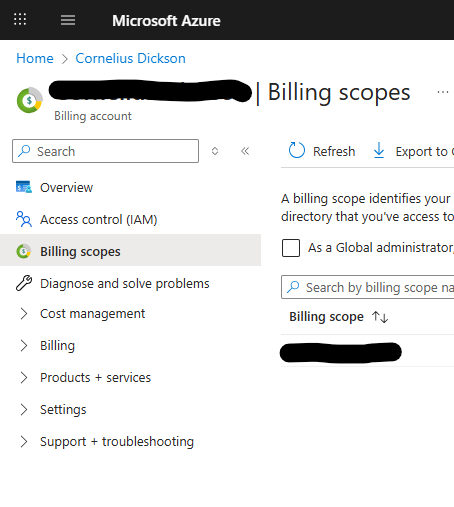
Creating a subscription is straightforward. However, you will realize that creating your second subscription is not as straightforward as the first. This is because the subscription is tied to an account. Having the same user account owning multiple accounts is not allowed. Given this, when you have created the first subscription, you can be the account owner. The next time, you may not be able to create a subscription using the same account. To create a subscription, you need to follow the following steps.
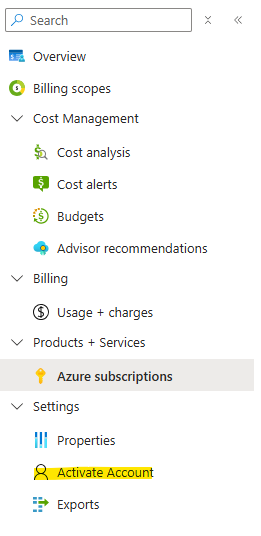
- Create an Account; this may require you to create department and other cost center details and assign an account owner (if a real account owner is not available, you can create a pseudo account and then delete it after the subscription is created).
2. The account owner needs to log in and activate the account. It’s important; if this activation is not done, you will not be able to create the subscription.
3. Now you can create the subscription.
For subscription creation, you need to mainly know the following menus in the Azure portal.
Different flavours of MS SQL in Azure
- Azure SQL Database(PaaS)
- Azure SQL Managed Instance (PaaS)
- SQL Server on Azure Virtual Machine(IaaS)
 Discover the Joy in Learning!